






Part I – POR_CUSTOM_PKG
One of the common requirements in iProcurement implementation is to perform custom defaulting or validating fields in requisition header/line/distribution during Requisition creation. For example, you may want to default project value based on requestor or validate deliver-to location to check if it is valid for a project etc. The objective of the article is to share different approaches I learnt from my experience, to achieve it.
I will take a simple requirement to explain each of the approaches and analyze their pros and cons. My requirement in is as follows as. Please note I'm using 11.5.10.2 iProcurement.
Requirement:
I’ve defined attributes (Attribute15) on requisition header and line with the name “Fund”. Fund attribute on the line drives charge account generation. User is required to enter fund on header in ‘Checkout: Requisition Information’ page, this value is defaulted or copied to fund attribute on the line. This means user doesn’t have to enter fund attribute for all the lines in the requisition, in fact fund on line is not displayed unless it is shown using OAF Personalization (DFFs are by default not shown in OAF page). Only Fund attribute on header is displayed by setting ‘Rendered’ property to “true” for item ‘ReqHeaderDFF’ using OAF Personalization. Fund on requisition header in Checkout page is shown in the below screenshot.
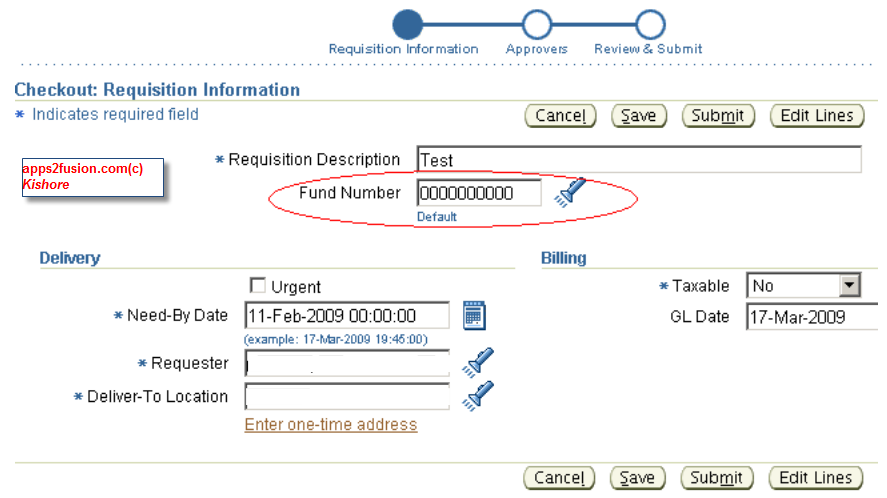
Different solution approaches for addressing the above requirement are:
POR_CUSTOM_PKG
This is Oracle seeded package provided as a hook to include custom defaulting and validation logic in iProcurement requisition creation.
Extending Application Module and Controller of Checkout page using OAF extension.
Create a method to copy fund from header to line in extended application module. Extend controller to make a call to that AM method during page events like Edit Lines, Submit etc.
Extend existing Helper / Server Command classes using OAF.
iProcurement OAF architecture is designed to use Server Command and Helper classes to encapsulate the business logic. These additional classes contain code that would normally be placed in Application Module. The code is separated to prevent AM from growing too big and promote reusability. We can extend these classes to place custom logic to meet our requirement. This approach requires good understanding of OAF and its integration with underlying BC4J components.
I will use above approaches to implement my requirement, and point out some limitations of each approach. This first article in the series has implementation using POR_CUSTOM_PKG.
Approach 1: POR_CUSTOM_PKG
POR_CUSTOM_PKG provides customization hooks to perform the defaulting logic and validation of the requisition header, line, and distribution data. The procedures in this package are called during requisition creation in iProcurement. Requisitions created in Purchasing module doesn’t use this package.
The procedures are invoked from CustomReqHeaderHelper, CustomReqLineHelper, and CustomReqDistHelper classes which implements interface classes PoRequisitionHeaderEOHelper, PoRequisitionLineEOHelper, and PoReqDistributionEOHelper respectively. Without going too much into details of their implementation, let us look at different pl/sql procedures available in por_custom_pkg.
This package contains 7 procedures (3 for defaulting logic, 3 for validations and 1 for updating charge account). Function of each procedure is self explanatory by looking at their names; I will give a gist of each of them:
| Procedure Name | Purpose |
| CUSTOM_DEFAULT_REQ_HEADER | Customize it to include header defaulting logic. It is called when new requisition is created from scratch or copied from old requisition. Header DFF attributes are available to use. |
| CUSTOM_VALIDATE_REQ_HEADER | Customize it to include header validation logic. This validation would in addition to all validations done for requisition header. It is called when new requisition is submitted / saved. |
| CUSTOM_DEFAULT_REQ_LINE | Customize it to include Line defaulting logic. It is called when new requisition line is created. Header information plus line information including DFF attributes are available to use. |
| CUSTOM_VALIDATE_REQ_LINE | Customize it to include Line validation logic. It is called when new requisition line is submitted / saved. |
| CUSTOM_DEFAULT_REQ_DIST | Customize it to include distribution defaulting logic. It is called when new distribution is created. |
| CUSTOM_VALIDATE_REQ_DIST | Customize it to include distribution validation logic. It is called when new distribution is submitted / saved. |
| CUSTOM_UPDATE_CHARGE_ACCOUNT | Overrides default charge account. Use PO Account Generator workflow instead of this procedure. This procedure doesn’t execute at all. |
The above defaulting and validation procedures has common OUT parameters x_return_code and x_error_msg. These parameters can be used to return the results of the validation. Return code (x_return_code) can be used to indicate on which tab error message to be displayed to Edit Lines page.
If result code is 1, error is displayed on the Delivery tab
If result code is 2, error is displayed on the Billing tab
If result code is 2, error is displayed on the Accounts tab
These procedures are by default do not have any implementation. Once custom code is placed, three profile options control whether customization takes effect on existing requisition process.
The profiles are:
• POR: Enable Req Header Customization
• POR: Enable Requisition Line Customization
• POR: Enable Req Distribution Customization
These profiles have to be set to ‘Yes’ at site level, to tell iProcurement to execute customization in corresponding procedures.
Implementation:
Going back to my requirement of copying fund value from header to line, implementation requires:
Coding defaulting procedure for requisition line i.e. CUSTOM_DEFAULT_REQ_LINE
Profile “POR: Enable Requisition Line Customization” need to be set to “Yes” at site level.
In POR_CUSTOM_PKG.CUSTOM_DEFAULT_REQ_LINE procedure, header fund value is available in header attribute15 i.e. IN parameter header_attribute_15, copy its value to line fund value i.e. IN OUT parameter x_attribute15. Return 0 at the end to signal success. Below screenshot shows implementation of the procedure.
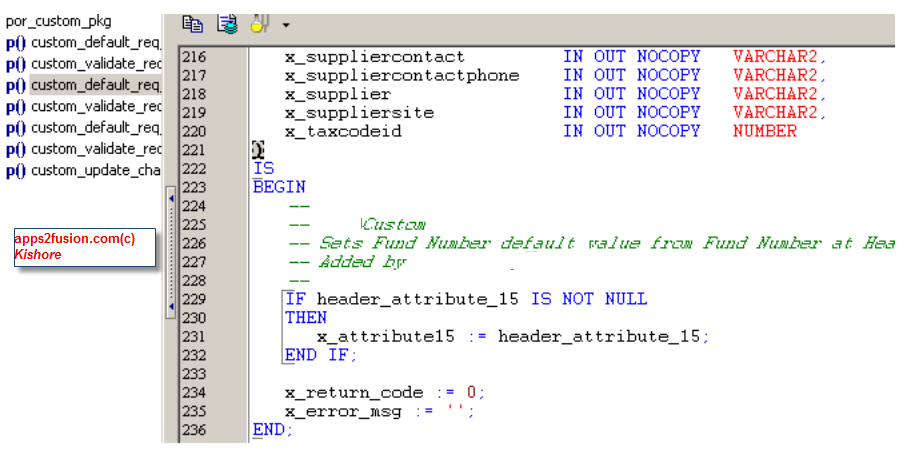
Advantages of this approach are it is simple and doesn’t require developer to have understanding of OAF or Java. If customization needs to turned off, clear the profile “POR: Enable Requisition Line Customization” value or set it to “No” at site level.
Limitations of this approach is defaulting procedures are only executed when requisition is first created. If the user changes fund value in header, new value is not copied to line because default procedure is not executed. So this implementation doesn’t fully solve the purpose.
A similar example where defaulting fails is, suppose you want to default a value say ‘0000000’ to header fund when requisition is created. We can code POR_CUSTOM_PKG. CUSTOM_VALIDATE_REQ_HEADER to copy ‘0000000’ to x_attribute15 if it is null. This works when requisition is created from scratch in Non-catalog request page or by selecting inventory item. iProcurement create new records in requisition header (po_requisition_headers_all) and line (po_requisition_lines_all) tables when checkout is done. Suppose you change fund value to ‘1234567’, save it, delete lines in requisition and start over from Non-catalog request page, default value ‘0000000’ is not shown for fund instead ‘1234567’ is shown. iProcurement doesn’t delete requisition header when lines are deleted. It uses existing header record i.e. same req_header_id which means default header procedure is not executed. These are few scenarios where I felt default procedures doesn’t work the way I wanted it to be. So I have to opt for alternative solution.
The next article in the series uses OAF extension of controller and application module to implement my requirement.


 Apps2Fusion Articles
Comments
The link below can compliment to your article, as it contains a live por_custom_pkg from past project.
apps2fusion.com/forums/viewtopic.php?f=75&t=145
Thanks,
Anil Passi
I have a very similar requirement and think your next article would help me a lot on developing the solution.
Coul d you please let me know when i can expect the follow up articles. Thank you very very much.
Thanks,
Krishna
I found the follow up articles. Thank you very much for all your efforts.
For others, below are the links to follow up articles:
Part II - Extend Application Module and Controller : http://apps2fusion.com/at/64-kr/381-iprocurement-extensions
Part III – Extend Server Command : http://apps2fusion.com/at/64-kr/383-iprocurement-extension-server-command
Thanks,
Krish na
The follow up articles can be found here
http://apps2fusion.com/at/kr/381-iprocurement-extensions
http://apps2fusion.com/at/kr/383-iprocurement-extension-server-command
Kishore
I have a requirement wherein I need to customize the 'PO Requisition Account Generator' to generate the charge accounts based on Requisition Header DFF values selected. I modified the 'Generate Default Charge Account' process and am able to verify that the process is completing successfully.
But the account is not being defaulted on the requisition lines as the 'Generate Default Accrual Account' is completing with Failure. Should all 'Generate Default Charge Account', 'Generate Default Accrual Account' and 'Generate Default Variance Account' complete successfully for the charge account to be defaulted?
Tha nks,
Krishna
Accou nt generator workflow has to complete without errors, to view charge account.
kisho re
According to one of my requirement, I have to disable the below profiles at site level:
• POR: Enable Req Header Customization
• POR: Enable Requisition Line Customization
• POR: Enable Req Distribution Customization
Please let me know, what is the impact of disabling of these profiles while creating requition?
Tha nks in advance.
Best regards,
Suman
Can I get some help on how much time does iProcurement implementation would take and what would one document in the scope statement. Any help in this regard will be highly appreciated.
R egards,
Nizam
I've been reading several of your articles. They are very helpfull!
I'm working on a IProcurement custom. I have to create a default Po Requisition charge account using two values configured by the user in the SoppingCart page (they are two custom lovs). Where is the oracle account generator invoked? Can I pass to this generator these custom values and the customize the account generator?
Did you consider scheduling a program to clean up all headers not having lines.
Regards ,
Bert Admiraal
I have a doubt in iProcurement defaulting for requisition line. Soon after we added the item to the shopping cart, requisition header and line got created. In requisition line we have column called DOCUMENT_TYPE_C ODE, which got populated as BLANKET or CONTRACT or NULL. Based on the value PO got created against an Blanket Purchase Agreement or Contract Purchase Agreement.
I need to know how the value was defaulted in the requisition line level.
I needed to add a validation on the charge account in iProcurement to ensure users had updated their default account.
I was able to get this working in about 5 mins after reading this article!
The POR_CUSTOM_PKG had all the variables I needed predefined.
Tha nks for such a relevant and concisely written article.
Regard s,
Luisa
i want to know whether express receive button can be disabled in oracle iprocurement
I want to know how we can default charge account based on Delivery location given. I mean to say if i change the delivery location the charge account automatically defaults to the one corresponds to delivery location.
Regards,
Sandhya.
How can I get the requisition_hea der_id and line_id in OAF. This is important since I would require these details to validate some data.
Note : I cannot use PL/SQL here. I need to display the error on page itself.
RSS feed for comments to this post