






This is continuation from APEX Search Page Tutorial where I implemented OAF Person Details Tutorial 01 in Oracle Application Express.
Objective: Implement "Delete Person" functionality as in OA Framework Tutorial 02.

Implementation Steps:
A brief overview of steps followed:
- Add a NULL report column 'DEL_ICON' for "Delete Icon".
- Define a hidden page item 'P1_DEL_PERSON_ID' to capture selected person id.
- Define column link with image and parameters
Upload deleteicon_enabled.gif in Shared Components > Images (Under Files section).
Go to column attributes for DEL_ICON. Change column link attributes as shown in below screenshot.
Link Text: [img src="#WORKSPACE_IMAGES#deleteicon_enabled.gif" alt="Delete"/] . P.S: Replace '[' with '' before using the img tag. The website is treating it as image if I didnot doctor the img tag.
Target: Page in this Application
Page: 1
Item1: P1_DEL_PERSON_ID
Value: #PERSON_ID#
- Create 'On Load - Before Header' page process with below PL/SQL to delete selected person.
Declare
Cursor c_del is select person_id from xx_person_details
where person_id = :P1_DEL_PERSON_ID;
l_person_id NUMBER;
Begin
Open c_del;
Fetch c_del into l_person_id;
If c_del%FOUND Then
-- Delete Person
delete from xx_person_details where person_id = :p1_del_person_id;
commit;
apex_application.g_print_success_message := 'Person Deleted';
End If;
Close c_del;
End;
- Set Condition Type of page process to when P1_DEL_PERSON_ID is NOT NULL as shown below.
Video:
The video demonstrations follow above implementation steps.
Video for adding Delete icon to report (6:55 min).
Video for implementing Delete procedure (9:35 min).
Screenshot of Person Details apex application after delete functionality is implemented. My application can be accessed using the url http://apex.oracle.com/pls/apex/f?p=a2fperson:1
Why did we add NULL column in report query? Can't we define computation column or a placeholder like in Oracle Reports or Discoverer?
As the report is generated of the SQL query, we cannot use computation column like in other reporting tools without modifying the query. We can also set same column link attributes to PERSON_ID rather than adding a new NULL column.
What is #WORKSPACE_IMAGES#?
It is a built-in substitution string. APEX engine replaces it with location where uploaded images, JavaScripts (JS) and CSS specific to a workspace are found.
How is #WORKSPACE_IMAGES# different from #APP_IMAGES#?
#WORKSPACE_IMAGES# is used to reference uploaded images, JS, and CSS that are shared over many applications within a workspace.
#APP_IMAGES# is used to reference uploaded images, JS, and CSS that are specific to given application.
Try it yourself .... upload the above delete icon by not selecting application in Shared Components > Images and you use [img src="#APP_IMAGES#deleteicon_enabled.gif" alt="Delete"/] for column link text. Run the page and see what happens. P.S: Replace '[' with '' before using the img tag. The website is treating it as image if I didnot doctor the img tag.
URL shows P1_DEL_PERSON_ID parameter. User can edit the URL and delete the persons without clicking on Delete Icon. Are there better ways to implement Delete?
There are definitely more sleek ways to do it. Just a few food for thoughts:
- Enable 'Session State Protection' for application and set page access protection to 'Arguments must have checksum' to prevent user for tampering URL.
- Use JavaScript to copy value of selected Person Id to P1_DEL_PERSON_ID rather setting parameters in Column Link which shows up in URL.
- Use AJAX request i.e. htmldb_get function to call application process which deletes person record. This does not repaint the whole page.
I save these for later articles.
Packaged Application for Delete functionality:
My Packaged applications are created using APEX 3.2 version, you can only import them into APEX with same version. This packaged application has supporting objects i.e. table and sample data, along with apex application. You can import and run it without going through the above steps.
Download Tutorial 02 Packaged Application
Video for deploying packaged application (2:41 min). This video is applicable for deploying packaged applications for my next articles as well.
The zip has sql files for application (apex_tut02_app.sql) and image (apex_tut02_img.sql). For deploying image, select file type as 'Image Export' as shown in below image.
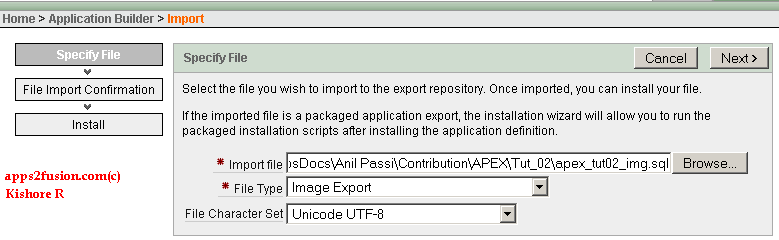
The next article I will implement Create and Update Person functionality as in OA Framework Tutorial 03 and Tutorial 04.


 Apps2Fusion Articles
Comments
How are you doing..?
One moer general question here, is Oracle Application Express an advanced version of OAF, is Oracle applciation Express going to replace OAF by oracle?
I think its really easier and quick to develop pages here than we do it by OAF.
Thanks
Abdul
I'm going well. Thanks
APEX and OAF are totally different. ADF not APEX going replacing OAF in Fusion Middleware or new versions of EBS. APEX is evolving as a superior RAD tool, which has integration with EBS and wen services. Most Oracle developers are embracing APEX because it is easy to learn and yet powerful.
Kish ore
First of all thanks for APEX kickstart articles they have definitely help me alot as I am new to APEX.
I have one question for which I want your suggestion.
I have requirement to capture where if I would be coming from some page say 'page23' then page 2 items should be displayed as uneditable.
Ca n you please mention how I can cater this case in Apex.
Would be obliged for your help !!!
Thanks
Reg ards,
Hassan Shoaib
Your requirement is to make page items in a page say '2' as Read-Only depending upon the page it is navigated from. Suppose parent page is '23', page 2 items are read-only. Otherwise page 2 items are editable.
The following is one way to achieving it. This applies only to page items not Tabular form columns.
1. Define Application Item say 'PARENT PAGE ID' in Shared Components > Application Items.
2. Go to page 23, in column link to page 2. Add a new item 'PARENT PAGE ID' with value as '&APP_PAGE_ID.'
Here you are setting current page id i.e. 23 to application item. So when you go to page 2, you can refer application item to get parent page id.
3. Go to page 2, in page item say 'P_STUDENT_FLAG ' Read Only section, set the below
Read Only Condition Type: Value of Item in Expression 1 = Expression 2
Expression 1: PARENT_PAGE_ID
Expression 2: 23
So if you navigate to page '2' from another page say '4', Read-Only condition is evaluated to false and the page item is editable.
Hope this answers your requirement.
K ishore
Thank s.. I have implemented your suggested solution and it worked.
Thanks again for the correspondence.
Regards,
Hass an Shoaib
Please check if LINE_ID column name exists or not?
Kishore
Thanks for sharing your solution.
Kisho re
one thing I would like to ask is how you implemented the edit action to update records. How can I do this
without using standard reports?
I used wizard to create a form as shown in this article http://apps2fusion.com/at/64-kr/392-oracle-apex-person-details-tutorial-03-create-and-update-person. 'Automated Row Fetch' process in Form page fetches data based on populated person_id field. 'Process Row' process will insert/update the record based on whether person_id is null or not.
How you navigate to Form page for insert/update drives your implementation. In my case, I navigated from standard report. If user clicks on update icon, I pass person_id to form page.
Kishore
first thanks for this site and tutorials, i'm using apex for 1 months and i want to use checkbox in order to delete rows in report instead delete icon , but i dont knew how, should i use the same procedure with delete icon .
Can you suggest a solution ?
I have a question like this: I want to create a form with some basic actions (insert, delete, update). However, I dont want to keep the default behavior of APEX. I want to customize the insert and deleted action. Like I will update a "Is_Deleted" status to "1" to mark that the record is deleted and also user name who deleted, time deleted .... How can I do this?
I have a requirement in Tree Query where i need to display the node text in color ,but when i am using HTML tag ,the tag code is displaying as complete,as this Tree has do not have the option of standard report column.Can you please guide how to implement this.
Thanks,
Saquib
RSS feed for comments to this post