






Authorization is a process of determining whether an authenticated/identified person is permitted to access a resource or do an operation. It is based on set of privileges or roles assigned to the user. For Example, In Oracle database, Administrator have privilege to schedule jobs, while an user cannot.
How is Authorization different from Authentication?
Often Authentication and Authorization work together. In other words, Authorization follows Authentication.
Authentication determines Who are you?
Authorization determines What you are allowed to do?
How to implement Authorization in APEX?
Authorization schemes are created/managed in Shared Components > Authorization Schemes (Security section). An Authorization scheme can be specified for a page or region or button or page item or navigation tabs or processes. It is evaluated to either true or false.
To understand APEX Authorization, I will illustrate a simple example in Person Details Demo application. I've implemented Authentication in previous article, where I added two users a2f_admin and a2f_user. a2f_admin user has Admin_Flag set to 'Y' in DEMO_USERS table.
My scenario is
- a2f_admin can create,delete,edit and view persons.
- a2f_user can only view persons and does not have privilege to create/delete/edit them.
Steps to implement the above scenario:
- Go to Shared Components > Authorization Schemes (Security section). Create authorization scheme from scratch.
- Enter name for authorization scheme. To identify admin user I will check if the user has ADMIN_FLAG set to 'Y' in DEMO_USERS table. So I use scheme type 'Exists SQL Query' and use below SQL. v('APP_USER') is used to fetch the logged in user name.
select 1 from demo_users
where user_name = v('APP_USER')
and admin_user = 'Y'
- Error Message has to be entered. It will be displayed if the scheme type fails.
- Once the authorization scheme is created, it can be specified to a page or region or page item. As I want only admin user to create persons, I navigate to Search Person (Pg 1) and assign 'Admin_Only' authorization scheme to create button.
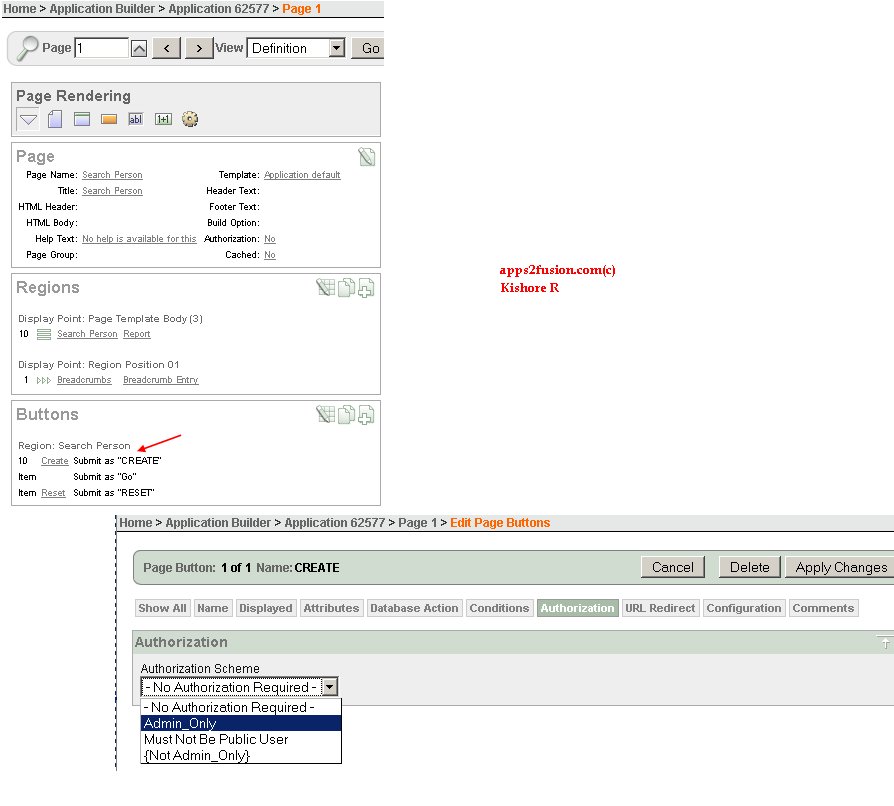
- Similarly assign authorization scheme to edit, delete report columns.
- Apply Changes. Run the application. Below screenshots show how create/edit/delete are not shown for 'a2f_user' user.
So Authorization is achieved by writing to simple SQL query and specifying the scheme to page components.
I could do same thing with conditional display. Why choose Authorization?
Conditional Rendering and Processing helps control the display of a region or page item as well as execution of processes, computations and validations. For example, you can render create button only when the user has admin_flag set to 'Y', using similar SQL condition specified in authorization scheme creation.
Conditional display and Authorization acts similar for page items. But conditional display cannot be specified to page or application itself, while Authorization can be.
Can I use Authorization scheme programmatically in a condition?
Yes. You can use API apex_util.public_check_authorization() to check if Authorization scheme succeeds or fails. Create button can be implemented using this API.
URL for the application:
My application can be accessed using the url http://apex.oracle.com/pls/apex/f?p=62577:1
Packaged Application:
My Packaged applications are created using APEX 3.2 version, you can only import them into APEX with same version. This packaged application has supporting objects i.e. table and sample data, along with apex application. You can import and run it without going through the above steps.
Download Tutorial 03 Packaged Application
Video for deploying packaged application (2:41 min). This video is applicable for deploying packaged applications for my next articles as well.
The zip file has sql files for application (apex_tut03_app.sql) and image (apex_tut03_img.sql).
You have seen how Authentication and Authorization provides additional security to the application.

 Apps2Fusion Articles
Comments
Nice to see this article.
I have a question here, say in a real time scenario where i have multipe operating units like one for US one for Canada, there when a user logins in US responsibility i have to default the currency to US $ and when user logins with Canadain Responsibility i have to defualt it with Canada $ how do i do that? And if i have to conditionally show some item or region onthe page depending onthe responsibility how do i do this...?
Thank s
Abdul.
I built a sample page to demonstrate your requirement. http://apex.oracle.com/pls/otn/f?p=15944:20
You can use Column link parameters in Switch Responsibilitie s page(20) to set page items in Responsibility page (21). and conditionally display page items in page 21.
I used below steps for http://apex.oracle.com/pls/otn/f?p=15944:20
Responsibility page (Pg 21)
1. Add HTML Region with following Display Text page items with Labels.
P21_CUR RENCY (Currency), P21_D1 (Display for Both), P21_D2 (Display for USD), P21_D3 (Display for CAD)
2. Add conditions with Condition Type PL/SQL Expression to P21_D2 and P21_D3.
Code:
P21_D2: :P21_CURRENCY = 'USD'P21_D3: :P21_CURRENCY = 'CAD'
Switch Responsiblities page (Pg 20)
1. Add report region with SQL
select 1 resp_id, 'US Superuser' resp_name, 'USD' currency from dual
Union All
select 2 resp_id, 'Canada Superuser' resp_name, 'CAD' currency from dual
2. Add column link (No header text) with following parameters
Link Text: #RESP_NAME#
Tar get Page: 21
Item1: P21_CURRENCY , Value1: #CURRENCY#
Item 1: P21_RESP_ID , Value1: #RESP_ID#
Item1 : P21_RESP_NAME , Value1: #RESP_NAME#
Ki shore
Congra ts for this very well written article.
Thank s,
Anil Passi
Thanks
If I understand correctly you want to implement Oracle EBS security model, where user logs to see his/her assigned responsibilitie s and clicking a responsibility would apply security associated with it.
I've implemented a similar model in one of my articles http://apps2fusion.com/at/kr/413-maintaining-authentication-between-apex-applications
In a nutshell, steps you would require are:
1) Create a sql report on a view similar to fnd_user_resp_g roups. Call this page as Navigator. If your apex installed database is different from EBS database, create a db link for the view. Refer this article on dblink http://apps2fusion.com/at/kr/393-how-to-access-oracle-apps-ebs-tablesviews-in-apex
2) Suppose your other page is Sales Order report with page no 3. Create a column link on above sql report attribute to navigate to page 3 and assign item P3_RESP_ID value. You can use this item P3_RESP_ID for security in page 3.
Kishore
Wrappi ng APEX_UTIL.PUBLI C_CHECK_AUTHORI ZATION in a function that returns a Y or N for use in a where clause didn't work as it appears PUBLIC_CHECK_AU THORIZATION writes some auditing information because I get "ORA-14551: cannot perform a DML operation inside a query". Do you have any ideas on this?
You can create a hidden item and have its value default to 'Y' or 'N' using APEX_UTIL.PUBLI C_CHECK_AUTHORI ZATION. Then modify the sql query to add where clause on hidden item.
Kishore
Thanks for providing this details. We have implemented applications with role based permission for the pages, however that got a bit messed up. Currently we have different packages which contains various functions to check the security and authoriztion. Now we are planning to implement an external single sign on which will be based on LDAP authentication and role based security.
I have following questions in this regard:
1. Do we need to create new scheme for LDAP based authentication. Authentication screen has fields to provided LDAP details, I believe it will work as it after entering those detials.
2. You have mentioned that we can use API apex_util.publi c_check_authori zation() for programatically do the authorization. Can you please explain it more how we can do this, if possible any reference or example.
Thank s in Advance for the solution.
Rega rds,
Navin
Ryan
RSS feed for comments to this post