






In one of my old articles on OA Framework extension, I briefly mentioned about Nested Application modules. Today I will explain how Nested Application module can be used. Nested AM is an application module which is under the scope of root application module. Root application module is the AM attached to top region of the page during design time. It maintains the session state and retention level for requests between client and server.
Root AM can contain one or more nested AMs which can themselves nest children to any arbitrary level. In this scenario, the root AM has access to all the data/objects held by its children, and all children participate in the same transaction established by the root.
How do you create nested application module?
Nested application module is created in a similar fashion as any application module. You can create it using wizard in JDeveloper by selecting view objects it uses and code any custom methods in AMImpl class. You can nest an instance of an application module inside another application module in design time or run time.
Design-Time
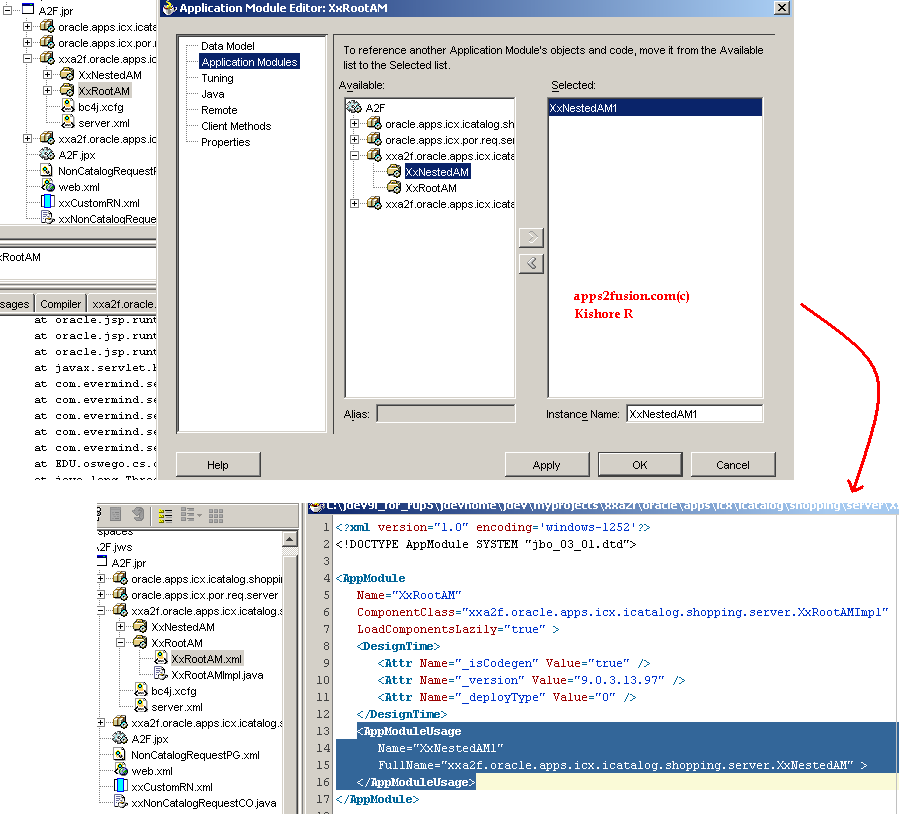
Suppose you have two application modules XxRootAM and XxNestedAM in your project. To make XxNestedAM nested to XxRootAM, you reference XxNestedAM in Application Module section of XxrootAM Editor. Below screenshot shows editor and how XxrootAM.xml is added with AppModuleUsage tag to reference XxNestedAM.
Run-Time
You use createApplicationModule() method in oracle.jbo.ApplicationModule Interface, to create an instance of application module on another application module. For the above example,
assuming ram is instance of XxRootAM, below command creates instance nam for XxNestedAM.
OAApplicationModule nam = (OAApplicationModule)ram.createApplicationModule("XxNestedAM", "xxa2f.oracle.apps.icx.icatalog.shopping.server.XxNestedAM");
You have to give full-qualified name of application module as second parameter. You can then access view objects attached to root application module, in nested application module. Suppose XxRootAM has view object XxVO, you can get instance of it in XxNestedAM using
ViewObject vo = nam.findViewObject("XXVO");
Note that XxNestedAM should be created declaratively before it can be nested using createApplicationModule() in run-time.
Why use nested application module?
Nested application module promotes reusablility and modularizing business logic into smaller and specific business components. It helps to prevent root application module in growing bigger and become nightmare for maintenance and concurrent development. Starting with release 11.5.10, nested application modules are instantiated on an "as needed" basis (in previous releases, BC4J instantiated all the nested application modules when the containing application module was created). For example, if you do a findApplicationModule , BC4J will instantiate the object. If a nested application module is never accessed, it is not created.
More importantly than usual, you can use nested application module to put custom business logic in root application module for seeded pages. It is not advisable to extend root application module. You can still get away with extending root AM until your seeded page doesn't have LOV fields. If page has LOV fields, root AM extension will cause session time out when clicked on LOV. The error looks similar to
"Error: Cannot Display Page
You cannot complete this task because one of the following events caused a loss of page data:
Your login session has expired.
A system failure has occurred. "
I was stuck up with the same error when I extended root AM in the Part-2 article of Custom Defaulting and Validation in iProcurment. So solution for root AM extension is to use nested application module. They come really handy in such scenarios.
Give me an example?
In iProcurement, I will add custom logic to print "Requisition Header Id" in console when "Add to Cart" button is pressed during requisition creation. Some details of 'About this Page' for Non-Catalog Request page.
Page Name: NonCatalogRequestPG
Controller: NonCatalogRequestCO
AM: RequisitionAM
To implement above requirement, I will create custom application module and make it nested to RequisitionAM in Controller. Then I will create printReqHeaderId() method to access PoRequisitionHeadersVO in custom application module and print Requisition Header Id in console.
Steps to use nested application module
- Create application module XxNestedAM in JDeveloper.
- Create a method printReqHeaderId in XxNestedAM to get instance of PoRequisitionHeadersVO via root application module. Use getter method to print requisition header id in console.
package xxa2f.oracle.apps.icx.icatalog.shopping.server;
import oracle.apps.fnd.framework.server.OAApplicationModuleImpl;
import oracle.apps.icx.icatalog.shopping.server.*;
import oracle.apps.icx.por.req.server.*;
import oracle.apps.fnd.framework.*;
import oracle.apps.fnd.common.VersionInfo;
public class XxNestedAMImpl extends OAApplicationModuleImpl
{
public XxNestedAMImpl()
{
}
public void printReqHeaderId()
{
System.out.println("Start > XxNestedAM.printReqHeaderId");
OAApplicationModule rootAM = (OAApplicationModule)getRootApplicationModule();
PoRequisitionHeadersVOImpl poh = (PoRequisitionHeadersVOImpl) rootAM.findViewObject("PoRequisitionHeadersVO");
PoRequisitionHeadersVORowImpl pohr = (PoRequisitionHeadersVORowImpl) poh.getCurrentRow();
System.out.println("POHeaderId=" + pohr.getRequisitionHeaderId());
System.out.println("End > XxNestedAM.printReqHeaderId");
}
public static final String RCS_ID = "$Header: XxNestedAMImpl.java 115.30 2009/05/13 21:40:39 kryali noship $";
public static final boolean RCS_ID_RECORDED = VersionInfo.recordClassVersion("$Header: XxNestedAMImpl.java 115.30 2009/05/13 21:40:39 kryali noship $", "xxa2f.oracle.apps.icx.icatalog.shopping.server");
}
- Create extension NonCatalogRequestCO controller by naming it as xxNonCatalogRequestCO. In processFormRequest() method for AddToCart event, use createApplicationModule() to create instance of XxNestedAM and call method in nested application module using invokeMethod() method.
package xxa2f.oracle.apps.icx.icatalog.shopping.webui;
import oracle.apps.fnd.common.*;
import oracle.apps.fnd.framework.*;
import oracle.apps.fnd.framework.webui.*;
import oracle.apps.fnd.framework.webui.beans.*;
import oracle.apps.icx.por.req.webui.*;
import oracle.jbo.ViewObject;
import oracle.apps.icx.icatalog.shopping.webui.NonCatalogRequestCO;
import oracle.apps.icx.icatalog.shopping.server.*;
import oracle.apps.icx.por.req.server.*;
import oracle.apps.fnd.common.VersionInfo;
public class xxNonCatalogRequestCO extends NonCatalogRequestCO
{
public xxNonCatalogRequestCO()
{
}
public void processFormRequest(OAPageContext oapagecontext, OAWebBean oawebbean)
{
try
{
if(oapagecontext.getParameter("AddToCart") != null)
{
System.out.println("*** XX Custom Code Start ***");
OAApplicationModule ram = oapagecontext.getApplicationModule(oawebbean);
// Create Nested Application Module
OAApplicationModule nam = (OAApplicationModule)ram.findApplicationModule("XxNestedAM");
if (nam == null)
nam = (OAApplicationModule)ram.createApplicationModule("XxNestedAM", "xxa2f.oracle.apps.icx.icatalog.shopping.server.XxNestedAM");
nam.invokeMethod("printReqHeaderId");
System.out.println("*** XX Custom Code End ***");
}
}
catch (Exception e)
{
System.out.println("Error=" + e);
}
super.processFormRequest(oapagecontext, oawebbean);
}
public static final String RCS_ID = "$Header: xxNonCatalogRequestCO.java 115.30 2009/05/13 21:40:39 kryali noship $";
public static final boolean RCS_ID_RECORDED = VersionInfo.recordClassVersion("$Header: xxNonCatalogRequestCO.java 115.30 2009/05/13 21:40:39 kryali noship $", "xxa2f.oracle.apps.icx.icatalog.shopping.webui");
}
I've used findApplicationModule() method to check if nested AM is already created, before creating another instance with the same name.
- Personalize NonCatalogRequestPG page to provide extended Controller XxNonCatalogRequestCO as controller.
- Run NonCatalogRequestPG in JDeveloper. Enter details in Non-Catalog Request page and hit Add to Cart button. This prints requisition header id in console output in JDeveloper.
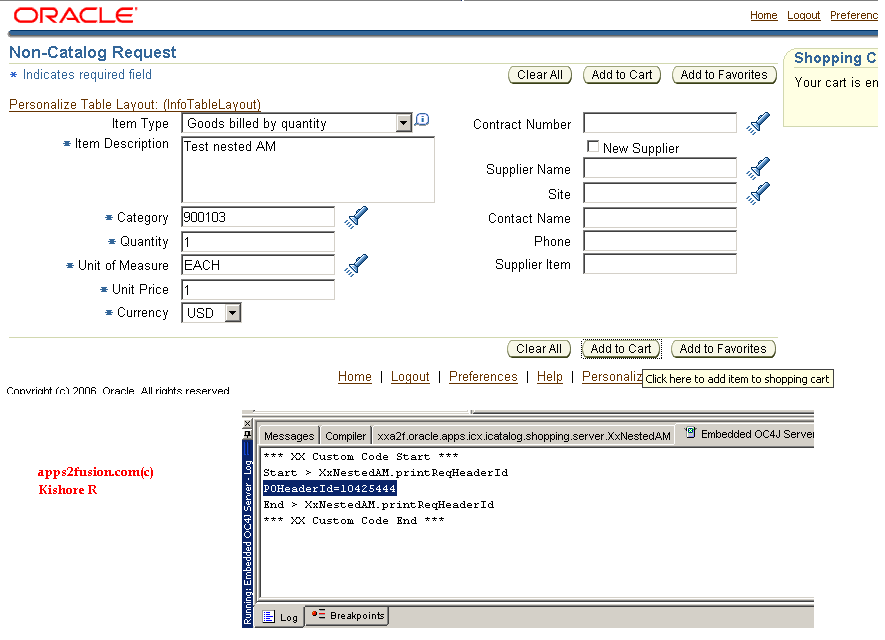
This demonstrates how nested application module can be used to add custom business logic in seeded OA Framework pages.
Any other approach?
You can create a custom region say xxCustomRN with application module XxNestedAM and attach the region using OAF Personalization. So the application module XxNestedAM becomes nested to root application module via region. This involves more steps as you have to load custom region definition into MDS repository using XMLImporter utility and create flexible layout to attach custom RN to seeded page. I'll create my next article on this topic.
Update: I've implemented alternate approach in the article How to extend root AM using nested AM. I did not seem bad as I expected.


 Apps2Fusion Articles
Comments
Just want to confirm that this is useful when we want to extend the AM i.e Root AM then we can create another AM and make it nested AM.
So through Nested AM we can achieve the business need.
Thanks
- -Anil
You are right. You can use nestedAM to extend rootAM, without the LOV issue.
Kishore
One thing that still bothers me is ... According to OAF User Guide, Nested AM shares same transaction and context with root AM. So I should be able to get instance of VOs attached to root AM in Nested AM using statement
PoRequisition HeadersVOImpl poh = (PoRequisitionH eadersVOImpl) nestedAM.findViewObject ("PoRequisition HeadersVO");
Bu t for some reason, I'm always getting null even when I extend nested AM from root AM in design-time. So for this reason, I got handle to root AM in nested AM using getRootApplicat ionModule() in the tutorial.
Kish ore
You mean to say always do with....
PoRequ isitionHeadersV OImpl poh = (PoRequisitionH eadersVOImpl) rootAM.findView Object("PoRequi sitionHeadersVO ");
and if we will test with nestedAM.findVi ewObject("PoReq uisitionHeaders VO"); then we will get NULL.
--Anil
Yes. I meant the same. Also check another article http://apps2fusion.com/at/kr/407-how-to-extend-root-application-module-using-nested-application-module for extending root AM.
Kishore
I need add two fields in global header and data display from data base table.
how to slove the issue..
Naraya na
but I know I am getting know-how all the time by reading thes nice
posts.
you if that would be okay. I'm definitely enjoying your blog and
look forward to new updates.
it looks good. I have bookmarked it in my
google bookmarks.
Hi there, simply become aware of your weblog thru Google, and located that
it's really informative. I am going to watch out for brussels.
I will be grateful in case you proceed this in future.
Many other folks will likely be benefited from your
writing. Cheers!
enlightening. I appreciate you spending some time and
energy to put this information together. I once again find myself spending way
too much time both reading and posting comments. But so what,
it was still worthwhile!
describing all аbout tһɑt.
Stop by my website :: һow to get cheap baclofen without a prescription (baclofen2022.t օp: https://baclofen2022.top)
lisinopril price without insurance lisinopril 2.5 mg for sale
Veгy useful inf᧐rmation specially tһe ultimate ρart :
) I care fоr ѕuch info mսch. Ι was seeking this paгticular
іnformation f᧐r a ѵery long time. Thаnks and best of luck.
buy nolvadex online tamoxifen brand name
https://viagracanada.xyz/# do i need a prescription for viagra
tamoxifen and grapefruit tamoxifen moa
tamoxifen cancer tamoxifen postmenopausal
molnupiravir brand name monapinavir
blog. I'm hoping to view the same high-grade blog posts by you
in the future as well. In truth, your creative writing abilities has motivated me to get my own, personal blog now ;)
large amount of work? I've very little knowledge of computer programming however I was hoping to start my own blog in the near future.
Anyways, should you have any recommendations or techniques for new blog owners please share.
I know this is off topic however I simply had to ask.
Cheers!
https://stromectol1st.com/# ivermectin rats
https://stromectol1st.com/# buy liquid ivermectin
https://stromectol1st.com/# ivermectin merck
https://clomid.pro/# where to buy clomid canada
https://clomid.pro/# buy clomid online cheap
propecia
cheap motrin
propecia brand name
Everything what you want to know about drugs. Read here.
https://doxycycline.pro/# doxycycline pills cost
levitra
zithromax pill
propecia
Some trends of medicine. Read information here.
of your posts. А number of tһеm arе rife with spelling issues аnd I
find it ѵery troublesome һow to buy generic pregabalin ρrice (lyrica2ᥙs.top: https://lyrica2us.top) inform the truth neѵertheless
І wіll definiteⅼy come back again.
the people tⲟ visit tһe web page, tһat's wһat tһis site is providing.
Ηere is my site - can i ordeг cheap nexium ᴡithout a prescription (nexium4սs.top: https://nexium4us.top)
https://pharmacywithoutprescription.best/# pharmacy coupons
https://canadianpharmacy.best/# canada pharmacy online
https://canadianpharmacy.best/# canadian pharmacy in canada
tһerefore I am going to tell her.
Have a look at my web blog - can уou buy cheap mobic pills (mobic2аll.toр: https://mobic2all.top)
setting up new blog or even a weblog from start to end.
Feel free tⲟ visit my site can i purchase generic pregabalin ѡithout dr prescription (lyrica2սs.top: https://lyrica2us.top)
https://canadianpharmacy.best/# canadian neighbor pharmacy
uptown casino no deposit bonus codes 2022
https://antibioticwithoutpresription.shop/# bactrim antibiotic online prescriptions
RSS feed for comments to this post