






Oracle APEX application is blazingly fast. Its' performance can be negatively effected by poorly written queries. To optimize application performance, you can use few substitution strings to see elapsed time for rendering each region in a page. This helps in pin pointing long running regions and tuning queries behind them.
Objective: Display execution time for Search Person region in Person Details demo http://apex.oracle.com/pls/apex/f?p=62577
Implementation:
Substitution strings used are
- #TIMING# shows elapsed time in seconds used when rendering a region. This includes time to render region items as well.
- #TOTAL_ROWS# displays total number of rows retrieved by SQL query
- #ROWS_FETCHED# shows the number of rows fetched by APEX. It shows page size if total total number of rows is greater than pagination rows.
- #FIRST_ROW_FETCHED# and #LAST_ROW_FETCHED# display the range of rows displayed. It depends on number of rows defined for pagination.
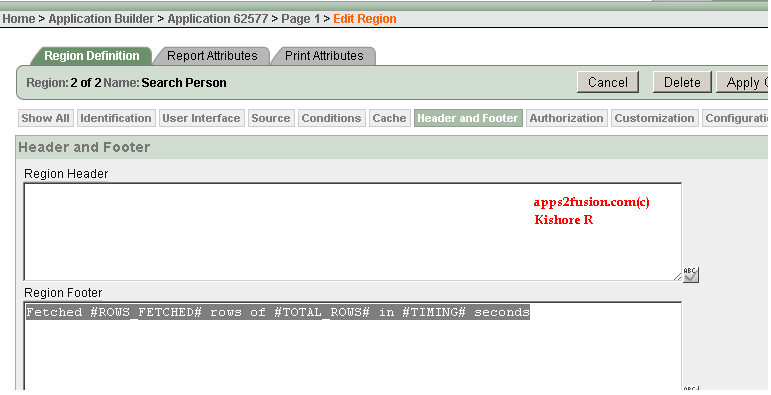
Using above strings, you can display a custom message like Fetched #ROWS_FETCHED# rows of #TOTAL_ROWS# in #TIMING# seconds in region footer. Please note than these substitution strings only work for region.
Steps to implement the above message in Search Person page.
- Edit region Search Person. In Footer, enter the message Fetched #ROWS_FETCHED# rows of #TOTAL_ROWS# in #TIMING# seconds
- Apply changes. Run the application
After the changes, you can see the custom message below the region. This message can be used for debugging purposes for the regions in a page.
Person Details application can be accessed using the url http://apex.oracle.com/pls/apex/f?p=62577:1


 Apps2Fusion Articles
Comments
RSS feed for comments to this post